# Using Github Flavored Markdown in the Netlify CMS Preview Pane


Document editing mode on Netlify CMS gives you two panes, one with the editor, and one with a preview. By using the global `CMS` object you can customize the preview. What we're going to do here is to make it render the markdown we write in the editor with [`react-markdown`](https://github.com/remarkjs/react-markdown) which we extend with the [`remark-gfm`](https://github.com/remarkjs/remark-gfm) plugin to add support for Github Flavored Markdown (tables, strikethrough, etc).
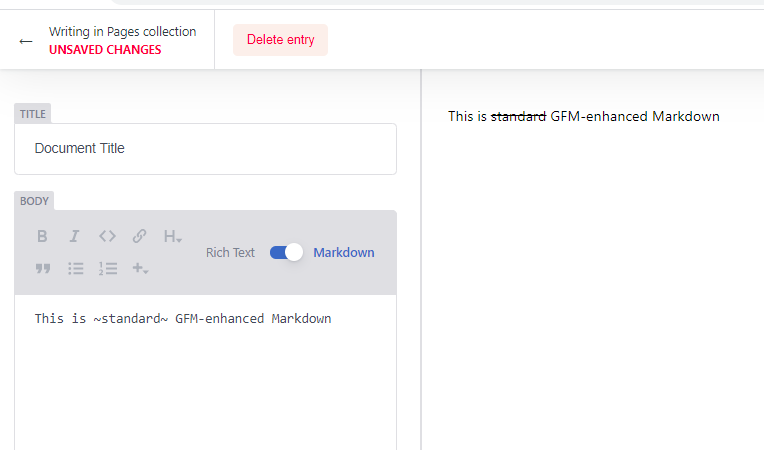
![Screenshot of Netlify CMS with GFM enabled preview](https://tobbe.github.io/assets/gfm_screenshot.png "NetlifyCMS GFM screenshot")

The way the preview customization works is you tell `CMS` what collection to use the custom preview for, and you give it a React component to use. You can only write old-school class components, and you have to use the `createClass` and `h` helper functions provided by NetlifyCMS.

Below is an example that creates a `DocPreview` React component and tells `CMS` to use that whenever it's showing a preview for a document in the `"pages"` category. The `render()` function uses the `widgetFor()` helper function (read more in the [NetifyCMS docs](https://www.netlifycms.org/docs/customization/#registerpreviewtemplate)) to get the default widget used to display the `'body'` field, and nothing else. By default the preview will show all fields, like "title" etc, but here we're stripping those out.

```html
<!DOCTYPE html>
<html>
  <head>
    <meta charset="utf-8" />
    <meta name="viewport" content="width=device-width, initial-scale=1.0" />
    <title>Netlify CMS Example</title>
  </head>
  <body>
    <script src="https://unpkg.com/netlify-cms@^2.10.0/dist/netlify-cms.js"></script>
    <script>
      const DocPreview = createClass({
        render: function() {
          return this.props.widgetFor('body');
        },
      });

      window.CMS.registerPreviewTemplate("pages", DocPreview);
    </script>
  </body>
</html>
```

Another thing we can do is take the plain text from the "body" field and dump it in a `<div>` with the `h()` function, which is basically just an alias for [React's `createElement()`](https://reactjs.org/docs/react-api.html#createelement).

```html
<!DOCTYPE html>
<html>
  <head>
    <meta charset="utf-8" />
    <meta name="viewport" content="width=device-width, initial-scale=1.0" />
    <title>Netlify CMS Example</title>
  </head>
  <body>
    <script src="https://unpkg.com/netlify-cms@^2.10.0/dist/netlify-cms.js"></script>
    <script>
      const DocPreview = createClass({
        render: function() {
          const bodyText = this.props.entry.getIn(["data", "body"]);

          return h("div", {}, bodyText);
        },
      });

      window.CMS.registerPreviewTemplate("pages", DocPreview);
    </script>
  </body>
</html>
```

Since we're writing all the code in a basic `index.html` file without any kind of build tooling to support us we can't just do `npm install` and then `include`-ing the package. All we have to work with is the `<script>` tag. So whatever we want to use has to be in AMD or UMD module format. Thankfully `react-markdown` provides an umd build we can use straight from [unpkg.com](https://unpkg.com).

So just put https://unpkg.com/react-markdown@5.0.3/react-markdown.min.js in a `<script>` tag, and you'll have `window.ReactMarkdown` available, which is a React component you can use inside your custom `render` method.

With this you should be back to something that works the same as when we used `widgetFor()` except now we're using our own Markdown renderer, and not Netlify CMS's.

```html
<!DOCTYPE html>
<html>
  <head>
    <meta charset="utf-8" />
    <meta name="viewport" content="width=device-width, initial-scale=1.0" />
    <title>Netlify CMS Example</title>
  </head>
  <body>
    <script src="https://unpkg.com/netlify-cms@^2.10.0/dist/netlify-cms.js"></script>
    <script src="https://unpkg.com/react-markdown@5.0.3/react-markdown.min.js"></script>
    <script>
      const DocPreview = createClass({
        render: function() {
          const bodyText = this.props.entry.getIn(["data", "body"]);

          return h(window.ReactMarkdown, {}, bodyText);
        },
      });

      window.CMS.registerPreviewTemplate("pages", DocPreview);
    </script>
  </body>
</html>
```

The final step is to add support for Github Flavored Markdown, so we can do tables, strikethrough text and other things. The `window.ReactMarkdown` component takes a `plugin` prop that lets you augment it with different plugins, one which is [`remark-gfm`](https://github.com/remarkjs/remark-gfm). Unfortunately that package doesn't have a UMD build for us to use, it's only available in CJS (CommonJS) format. There is a tool called Browserify that takes CJS modules and converts them to modules that can be used by the browser. But it's a command line tool that you'd add to your tooling. Which, we don't have here. Thankfully someone turned it into a web service we can use! https://wzrd.in takes any npm package and tries to run it through Browserify and serves up the built package for you. First time it's run it takes a while, but after that it's cached and then it's much faster. Here's the link for the Browserified version of remark-gfm: https://wzrd.in/standalone/remark-gfm@1.0.0. Add that to a script tag and you'll have the plugin available at `window.remarkGfm`. Add that as a plugin to react-markdown and you're done!

```html
<!DOCTYPE html>
<html>
  <head>
    <meta charset="utf-8" />
    <meta name="viewport" content="width=device-width, initial-scale=1.0" />
    <title>Netlify CMS Example</title>
  </head>
  <body>
    <script src="https://unpkg.com/netlify-cms@^2.10.0/dist/netlify-cms.js"></script>
    <script src="https://unpkg.com/react-markdown@5.0.3/react-markdown.min.js"></script>
    <script src="https://wzrd.in/standalone/remark-gfm@1.0.0"></script>
    <script>
      const DocPreview = createClass({
        render: function() {
          const bodyText = this.props.entry.getIn(["data", "body"]);

          return h(window.ReactMarkdown, { plugins: [window.remarkGfm] }, bodyText);
        },
      });

      window.CMS.registerPreviewTemplate("pages", DocPreview);
    </script>
  </body>
</html>
```

Try writing some markdown jazzed up with a bit of gfm syntax to make sure everything works.

That's it. Hope this guide was helpful!

<span style="font-size: 80%">(Header photo by <a href="https://unsplash.com/@richygreat?utm_source=unsplash&amp;utm_medium=referral&amp;utm_content=creditCopyText">Richy Great</a> on <a href="https://unsplash.com/s/photos/github?utm_source=unsplash&amp;utm_medium=referral&amp;utm_content=creditCopyText">Unsplash</a>)</span>
